You can give your team better software, faster systems, and access to more data, but if people don’t know how to use them, those investments only go so far.
What they need is better digital skills, and that’s more important than ever. One recent report found that 92% of
all jobs
require digital skills, and about one-third of workers lack the foundational skills needed for them.
This isn’t something that affects only individual performance, but can slow down everyday work, create communication problems, expose security weaknesses, and negatively impact how customers feel about your business.
 Since these are mistakes no business can afford, this ZandaX article highlights the most important digital skills every team needs to improve.
1. IT and Cloud Literacy
Not everyone is an IT expert, that’s fine, but everyone should know how to work with cloud applications, shared files, access permissions, and basic troubleshooting.
Even the smallest knowledge gaps can become a bigger problem when employees lose time searching for documents, struggle with login issues, or create duplicate files.
For extra support to internal teams, many turn to
managed service providers that help businesses improve IT operations. They can work with more complex technical issues, maintain key systems, and offer support when employees can’t do it on their own.
Teach people the systems they use on a daily basis. Show them how to store and share files, what to check when an application stops working, and when it’s time to contact IT.
2. Digital Communication and Collaboration
A message that’s sent quickly doesn’t always equal saved time. If your team uses email, chat, video calls, and shared workspaces, but without agreed habits, information goes all over the place.
All it takes is for someone to miss a decision in a group chat, someone else working from an outdated file, and there’s an unnecessary meeting for a question that could’ve taken two minutes to answer.
Digital communication, one that’s strong, starts with choosing the right place for each conversation. Chat is often for quick questions, shared documents for feedback, and a project platform for progress updates. Still, for this to work, everyone has to follow the same rules.
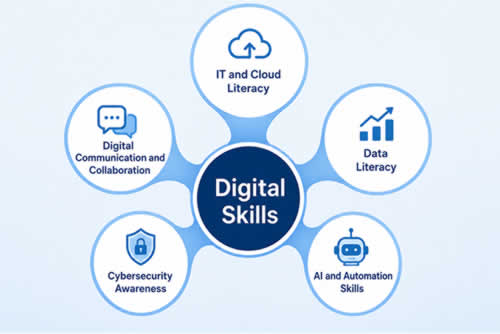
3. Data Literacy
Data reveals everything, but it’s only useful when the person reading it knows what the numbers mean and, more importantly, what to do with them.
We’re not talking about advanced analytical skills. Employees should be able to read dashboards, compare results, recognize unusual changes, and question things that seem out of context.
This isn’t a skill useful for one particular team, but for almost every department. For example, a sales team can examine conversion rates to see where prospects drop off. Customer support can track repeated complaints and find issues that need attention.
Teach employees to look beyond a single metric, too. A rise in website traffic doesn’t mean much without knowing whether those visitors became leads or customers.
Here’s a useful exercise. Take a report your team already uses and ask three questions: What changed? What could explain the change? What action does the data support?
4. Customer Experience Technology
Your customer experience team might be friendly, but that doesn’t mean it’s good. They also need to know how to use the technology that tracks and supports customers all throughout their journey.
Some of the most used tools are customer relationship management (CRM) systems, customer journey mapping tools, personalization platforms, and customer data platforms. They all show what customers need, where they experience most problems, and how they interact with a business.
And this isn’t something only marketing can benefit from. Sales can use customer history to make conversations better, more relevant, while support teams can understand previous issues in seconds.

If you'd like to learn more about managing staff, why not take a look at how we can help?
Boost your team management skills with our online courses.
RRP from $33 – limited time offer just
$14.99
5. Problem-Solving With Digital Tools
Not every technical problem needs to turn into one more IT ticket. Sometimes, a missing file is just in the wrong folder. Or an application isn’t showing certain information because the employee doesn’t have the right permissions.
Before asking for help, employees should know what to check on their own. That could mean looking at settings, permissions, or filters, checking internal documentation, or using the help resources already available.
Once they can’t solve the problem on their own, they should be able to explain what happened and what they’ve already tried.
The point isn’t to replace support teams, but to reduce any avoidable requests and give IT better information when their help is really needed.
Cybersecurity Awareness
All it takes is
one careless click, and everyone gets hours of work fixing it. That’s why cybersecurity isn’t only for the IT department, but for the entire team.
Every employee regularly uses passwords, customer information, shared files, emails, and account access. It's their day-to-day choices and actions that can cause risks.
Strange-looking attachments? Fake login pages? Suspicious links? Spammy email addresses? Everyone should be able to spot them and then know how to react according to company policies.
Training for this skill should use real-life situations, those that can actually happen. Organize exercises with examples of fraudulent messages and explain reporting procedures.
6. AI and Automation Skills
AI and automation are here to remove routine work, but they shouldn’t remove human judgment. They can be used in many useful ways: for summarizing meeting notes, sorting incoming requests, preparing drafts…
But they’re not here to replace humans. The point is to spend less time on repetitive tasks and more time on work that requires decisions, expertise, and direct customer interaction.
AI is good, but it’s not perfect. It can produce content with inaccurate information, miss important context, or have biased results. There should always be a human verifying outputs before using them. Not to mention, they should always know which company or customer information must never be entered into unapproved tools.

To start the automation process, it’s best to choose one task people repeat every week. Next, check whether the new process saves time and maintains accuracy. Then, you can move on to the other tasks.
To Wrap It Up
So, is it worth investing in digital skills? Only if you want to make everyday work easier and better, all without needing a special team of technology experts.
You don’t need to turn every employee into an IT professional. Just give people enough knowledge and confidence to use the tools that are already available to them.
And those skills don’t have to develop overnight. At first, work on areas that create the biggest bottlenecks in daily work, provide training, and then build from there. When people have the skills to use technology well, the tools you’ve already invested in will become much more valuable.
Links to useful articles:
Article: Motivate an Underperforming Team: Your 5-Step Action Plan:
So, despite your best efforts, your team isn't exactly setting the world alight when it comes to per [...]
Article: How to Keep Field Teams, Materials, and Projects in Sync:
Construction and field service projects only work well when people, materials, schedules, and inform [...]
Article: Remote Teams, Cloud Systems, Real Risk: How to Stay in Control:
Remote work didn't just change where people sit when they work. It changed what "business infrastru [...]
Article: 10 Effective Strategies for Management of High Performance Virtual Teams:
Remote work is becoming more of a standard as time moves on, and managing virtual teams effectively [...]