Most wasted lab space isn’t empty. It’s bench space taken up by something that's waiting, misplaced, or used only on another shift. A bench gets crowded when samples, consumables, paperwork, and technology share the same space without a clear reason.
For a lab manager, good lab design is a team performance tool. Use a simple three-zone check to place each item in active work, nearby support, or backup storage. This is a simple and practical way to organize the station around the work, not a compliance standard.
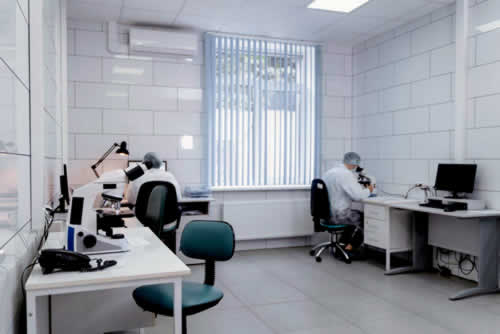 In this ZandaX article, we show how the check works best when the people who run the method help classify the items, because they know which delays and searches occur during a real shift.
Use the Three-Zone Check
Stand at the bench and follow one routine sample from receipt through reporting. Note where it is labeled, prepared, loaded, reviewed, and stored. Record every reach, turn, interruption, and search for an item. Those observations give the team a practical basis for improving the layout.
Look for the point where a routine job changes character. For example, the bench often holds tools from several stages of work at once. Keep what’s needed during the active job within reach, then move setup supplies, spare parts, manuals, and less frequent tools to labeled storage nearby.
The
OSHA laboratory standard is a useful reminder to place frequently handled materials where staff can use them with appropriate controls. A barcode scanner, notebook, vial rack, waste container, and label printer can quickly consume the same bench space. Make sure you give each one a defined home, and remove any item that has no role in the next job.
Draw a quick sketch of the instrument, operator position, and items used most often. Include containers, tools, records, keyboards, cables, and temporary trays.
Ask whether the current run needs an item at the bench or whether it’s there because nobody has assigned it storage. The answer creates a practical list of items to move, store … or remove.
Keep the Active Bench for Active Work
The active zone needs room for sample handling, instrument access, and the records or devices used during a run. It is not a holding area for unopened deliveries, retired cables, spare computers, or stuff that’s awaiting a decision.
Store current materials approved for the method close enough for safe use. But keep reserve stock in a separate labeled location. This provides space to work and reduces the chance of taking an item from the wrong box during a busy period.
Let’s illustrate this with an example from gas chromatography. The choice of
GC columns belongs in the method record before a column reaches the workstation. The linked GC-column resource is a starting point for options, while the approved phase, dimensions, and instrument requirements decide what belongs in the workflow.
Label the storage location and keep the method reference with the instrument records, so unconfirmed consumables don’t accumulate on the bench.
Give the Computer a Defined Space
The computer is part of
an analytical workstation. It needs physical space, suitable connections, access to the instrument, as well as a clear role in the workflow.
A laptop placed wherever there is room can get in the way! It can block a keyboard, force cables across an aisle, or even separate the analyst from the screen needed during a run.
Before deciding where the computer will sit, confirm the following.
- Supported operating system and instrument software version.
- Required ports and display setup.
- Network access and local controls.
- Space for the monitor, keyboard, cables, and any dock.
A simple equipment diagram makes it clear whether the layout leaves enough working space.
Make sure you keep a record linking the workstation name, instrument identifier, software version, connected devices, and responsible owner. A useful inventory helps prevent old accessories and unknown devices from accumulating at the bench.

Laptops are an obvious culprit here because they can be left pretty well anywhere. And just because you may have a
refurbished Dell laptop rather than a new state of the art “latest model”, you need to review the configuration and condition of each unit. Confirm compatibility before it enters the workstation plan. A portable computer is a great way to solve a defined space or workflow need, but it shouldn’t become another item without a home.
Separate Daily Tools From Backup Storage
Use three storage levels.
- The active zone holds items needed for the current run.
- Nearby storage holds items used during the shift.
- Reserve storage holds stock, cleaning materials, shipping boxes, and retired equipment.
Label shelves and drawers by purpose. Managers can turn these locations into a simple shared standard during training.
A good example would be to keep one location for cables, one for approved spare parts, and one for materials awaiting review. Try your best to avoid a “catch all” drawer because it usually becomes a dumping ground, and simply moves the search problem out of sight.
Old digital equipment needs the same discipline. When a computer, removable drive, or storage device leaves the workstation, follow the laboratory’s approved process.
NIST SP 800-88 Rev. 2 provides media sanitization guidance.
A planned exit process stops outdated devices from becoming permanent bench clutter.
Use a visible staging limit for the space beside the instrument. It’s for samples and tools needed during the current job, not for anything that “may be useful later”.

When the limit is full, staff must either return an item to storage, complete the task, or move the material to its proper holding area. This protects the active bench from slowly building up with clutter.
At the end of the job, rtidy up! This sounds simple, and obvious, but it’s easy to forget (or should we say ignore). Make sure you return reusable tools and remove packaging, notes, and empty containers. A short reset makes the next person’s job easier and makes problems with storage obvious before they become part of the layout.
Make Handover Part of the Layout
A layout proves itself when another analyst takes over. The incoming person should be able to identify the instrument, find the current method, locate approved consumables, and use the correct computer without searching through piles or relying on memory.
This makes the layout part of day to day training, not a personal system known by one person.
After changing a layout, adding equipment, or moving storage, run a short handover walk through. Ask the next analyst to find the method, the correct computer, current supplies, and the escalation contact. Any hesitation tells you what needs clearer training, labels, or storage.

If you'd like to learn more about what we provide, why not take a look at how we can help?
Boost your skills with our market-leading online courses at super-low prices.
Keep only quick reference information at the station. The full procedure can remain in its controlled location. And a concise local card can point staff to the current procedure, instrument identifier, and support route without duplicating controlled content.
Review the Layout as Work Changes
Layouts drift as methods change, equipment is replaced, and teams develop workarounds. Review one workstation each month or after a meaningful change.
Look for blocked access, duplicate items, unused devices, loose cables, full staging areas, and supplies stored in the wrong zone.
Do not reorganize the whole lab at once. Remove one unused item, assign one better storage location, shorten one cable route, or move one frequently used tool within reach. Small changes work when they follow the actual sample route.
Keep the review visible to the team. Give the workstation owner one place to record blocked access, missing labels, duplicate equipment, and recurring searches.
Discuss the findings during a routine team meeting, then assign one small correction with an owner and a date. This stops layout problems becoming permanent habits.
The strongest workstation gives each item a purpose and a place. When teams use the three-zone check, train people on the layout, and review it together, staff spend less time moving around the lab and more time performing the analysis that matters.