You run a lean shop, especially if you’re a small business, so “training” often means a last-minute PDF, a quick hallway demo, or shadowing the lone veteran who’s already stretched thin. It keeps the lights on … but it won’t scale.
According to the LinkedIn
Workplace Learning Report, 94% of employees would stay at a company longer if it invested in their learning. Modern, cloud-based platforms let you launch polished courses, track progress, and grow skills - no instructional-design army or servers required.
This ZandaX guide looks at six proven tools and shows you how to pick the right fit for your team.

How We Picked the Best
You deserve recommendations you can trust, not a grab-bag list. We spent three weeks test-driving 23 learning platforms through a small business lens.
Our scorecard hinged on six questions every owner asks:
- Is the interface so intuitive you can launch a course before lunch?
- Does pricing stay friendly as your headcount grows?
- Does the tool supply ready-made content or leave you staring at a blank slide?
- Are core LMS features such as quizzes, progress tracking, and reports built in or bolted on?
- How fast does support reply when there’s no IT person on payroll?
- Do other small teams rave about it in public reviews?
We weighted these factors, ran real onboarding scenarios, and tallied the results. The six top scorers you’ll meet next deliver the best mix of simplicity, value, and proof - so you can get back to running the business instead of wrestling with complex employee training software that takes over your life.
At-A-Glance Comparison
Before we dive into the individual reviews, it helps to see the front-runners side by side. Use the grid below to link your top need - price, built-in content, or mobile focus - to the platform designed to cover it.
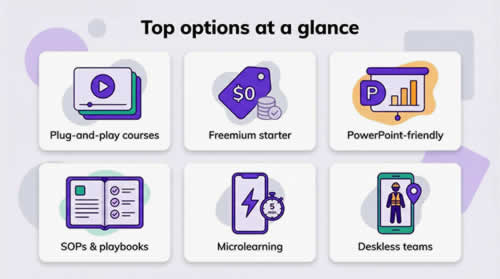
| Best for | Starting price | Free plan? | Stand-out feature |
| GoSkills |
| Plug-and-play courses | 49 per month for up to 25 users | Yes | 150+ micro courses included |
| TalentLMS |
| Budget-friendly basics | FREE for 5 users, paid tiers from $89 per month | Yes | Forever-free tier you can grow out of |
| iSpring Learn |
| Rapid roll-out & PPT authoring | $2.87 per active user per month | 30-day trial | One-click PowerPoint-to-course publishing |
| Trainual |
| SOPs and playbooks | $99 per month for 10 users | 14-day trial | Role-based "company playbook" templates |
| EdApp |
| Free microlearning | Free for core plan | Yes | 800+ editable courses with gamified templates |
| Connecteam |
| Deskless teams | Free for up to 10 users, then $29 per month for 30 users | Yes | Training sits inside an all-in-one workforce app |
1. GoSkills: best overall for plug-and-play learning
Built for managers and leaders who don’t want to wrangle tech but still need the team upskilling by Monday,
GoSkills’
employee training software lets most teams assign their first course and begin tracking progress in under an hour. For small businesses or hard-pressed corporate teams, this can be a godsend.
Sign up, invite employees, and within minutes everyone can dive into bite-size lessons on Excel, project management, and soft skills. The library holds more than 150 courses, so you are never staring at a blank authoring screen.
The interface stays simple. Admin dashboards show who is cruising through content and who needs a nudge, while learners scroll Netflix-style rows of five-minute videos. That ease is not just marketing talk; GoSkills ranks at the top of “Easiest to Use” lists on major review sites.
Gamified badges keep motivation high, yet the real win is time saved. Instead of building slide decks, you assign a learning path and let the platform handle quizzes, reminders, and certificates. Pricing is straightforward: $49 per month covers up to 25 users, so you can grow training without side-swiping the budget.

2. TalentLMS: best freemium option when budget rules
Cash flow matters, and most free tools fall short.
TalentLMS is an exception with a forever-free tier that supports five users and ten courses, enough to prove the concept before you pay.
Creating content feels hands-on and quick. Drag in a video, add a quiz, hit publish, and new hires can start learning the same afternoon. When you outgrow the starter plan, paid tiers stay gentle on the wallet: less than $90 per month covers up to 100 people and unlocks unlimited courses plus integrations with Slack, Zapier, and common HR systems.
TalentLMS pairs depth with clarity. It supports SCORM and xAPI for future-proofing while the admin screens remain uncluttered. Learners can switch the interface into more than 30 languages, which suits multicultural teams. In short, you get mature LMS power at a starter-budget price, with room to grow as fast as your headcount.
3. iSpring Learn: best for rapid rollout and PowerPoint power
If your training lives in slide decks,
iSpring Learn turns that work into polished e-learning almost instantly. Install the iSpring Suite add-in, hit “Publish,” and your PowerPoint morphs into a trackable course complete with animations and timings, then lands inside a clean, cloud LMS.
The speed grabs attention, yet the pricing model is the quiet advantage. Plans start around $2.87 per active user each month, so summer interns don’t cost you a penny in December. During our tests the admin console felt tidy; learning paths, reminders, and certificate rules took minutes to set up, not hours.
Learners gain a mobile app that caches content for offline study, convenient for field reps with spotty coverage. Reports surface quiz scores and completion trends without burying you in filters. The one trade-off: there is no built-in course library, so plan to create or import your own content. If you value speed and already speak fluent PowerPoint, iSpring Learn lets you launch a professional program before the next onboarding class arrives.

If you'd like to learn more about what we provide, why not take a look at how we can help?
Boost your skills with our market-leading online courses at super-low prices.
4. Trainual: best for turning SOPs into living playbooks
Processes often live in people’s heads;
Trainual pulls them out and makes them actionable. Picture a digital handbook that quizzes employees as they read. You can write from scratch or start with generous templates, then assign each topic to the roles that need it. When a new hire joins, they receive every subject tagged to their position, and you watch progress rise in real time.
The editor feels like drafting in a modern doc tool. Drop images, short videos, or GIFs, then add a multiple-choice question to confirm the lesson stuck. Managers appreciate the accountability: completion logs, quiz scores, and e-signatures sit one click away for audits.
Pricing begins at $99 per month for 10 users. That is steeper than pure LMS options, yet teams often justify the cost after one week of not repeating the same how-to speech. If institutional knowledge is your bottleneck, Trainual transforms it into a scalable, searchable asset.
5. EdApp: best free microlearning with built-in course library
Training often fails because
lessons run too long for staff to retain knowledge.
EdApp solves that with 5-minute, phone-friendly bursts employees can finish while the espresso brews. The core platform and its library of 800+ editable courses cost $0, so even a bootstrapped startup can look like a Fortune 500 when onboarding day arrives.
Authoring feels closer to building Instagram stories than writing a manual. Pick a game-style template—swipe cards, match pairs, quick quiz—type your content, and publish. Gamification comes standard: points, leaderboards, and optional gift-card rewards that drive healthy competition without extra admin effort.
Because EdApp is mobile first, adoption rates soar in deskless industries such as retail, hospitality, and field services. Offline mode lets staff download lessons on Wi-Fi and train later without data charges. The trade-off is depth; complex, hour-long certifications fit awkwardly into micro chunks. Still, for fast, engaging knowledge bites on policy updates or product launches, EdApp is hard to beat at a price of free.

6. Connecteam: best for training a deskless, on-the-go workforce
Most LMSs assume employees sit at a keyboard. Your delivery drivers, baristas, or security guards do not.
Connecteam meets them on their phones by placing training inside the same app they already use for scheduling, time clocks, and team chat.
Building a course feels like writing a short mobile article. Add a photo, record a quick explainer video, insert a yes-or-no quiz, and publish to the “Kitchen Staff” group. Push notifications handle reminders while managers watch completions roll in during shifts. The free plan supports up to 10 users, and the basic tier starts at $29 per month for 30 seats, so you can train an entire location for less than one overtime hour.
The key advantage is context. A line cook clocks out, sees an unread lesson on the new allergy protocol, taps through five slides, answers two questions, and heads home smarter before the ride arrives. If your workforce rarely opens a laptop, Connecteam turns idle moments into learning moments.
How To Choose The Right Employee Training Platform
The standard advice we always give at ZandaX when starting any upgrade project is to
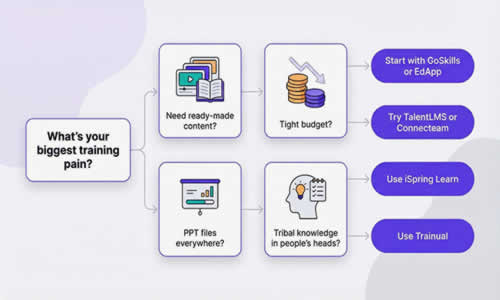
start with the single pain that costs you the most time. If content creation feels impossible, pick GoSkills or EdApp; both hand you a course library on day one. If budgets pinch harder than deadlines, TalentLMS or Connecteam provide generous free tiers so you can pilot without paying. Sitting on a pile of PowerPoint files? iSpring Learn converts them fastest. Need to capture institutional knowledge in a repeatable playbook? Trainual is built just for that.
Next,
map your workforce. Deskless staff thrive on mobile-first apps, while office teams may prefer a classic web dashboard. Count users realistically, then review each pricing model. A platform that charges per active user can save cash in seasonal businesses, whereas flat tiers shine when everyone trains every month.
Finally,
test two contenders side by side. Assign the same onboarding module, invite a small group, and track who finishes without hand-holding. The platform that sparks completion and avoids support tickets wins the rollout.
Your Five-Step Launch Plan
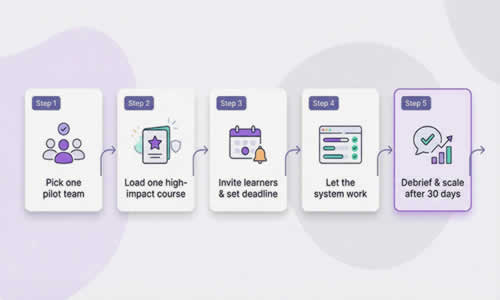
You’ve picked your platform and started a trial. Follow this quick roadmap to roll out training without wrecking the week.
- Pick one pilot team. A single department keeps variables low and feedback honest.
- Load one high-impact course, ideally onboarding or mandatory safety, to prove value fast.
- Invite learners and set a visible deadline. Public due dates push completion better than private reminders.
- Let the system work. Skip manual chasing and watch the dashboard for real-time progress.
- Debrief after 30 days. Ask the pilot team what worked, adjust content or notifications, then scale to the rest of the company.
Conclusion
Small businesses can now use state of the art employee training software to create and deliver polished, engaging courses. And without needing a dedicated L&D department. Start with a clear pain point, pilot one of the six vetted platforms, and follow the five-step launch plan to embed learning into everyday work. The right software turns expertise into growth - no mega budget or army of trainers required.